
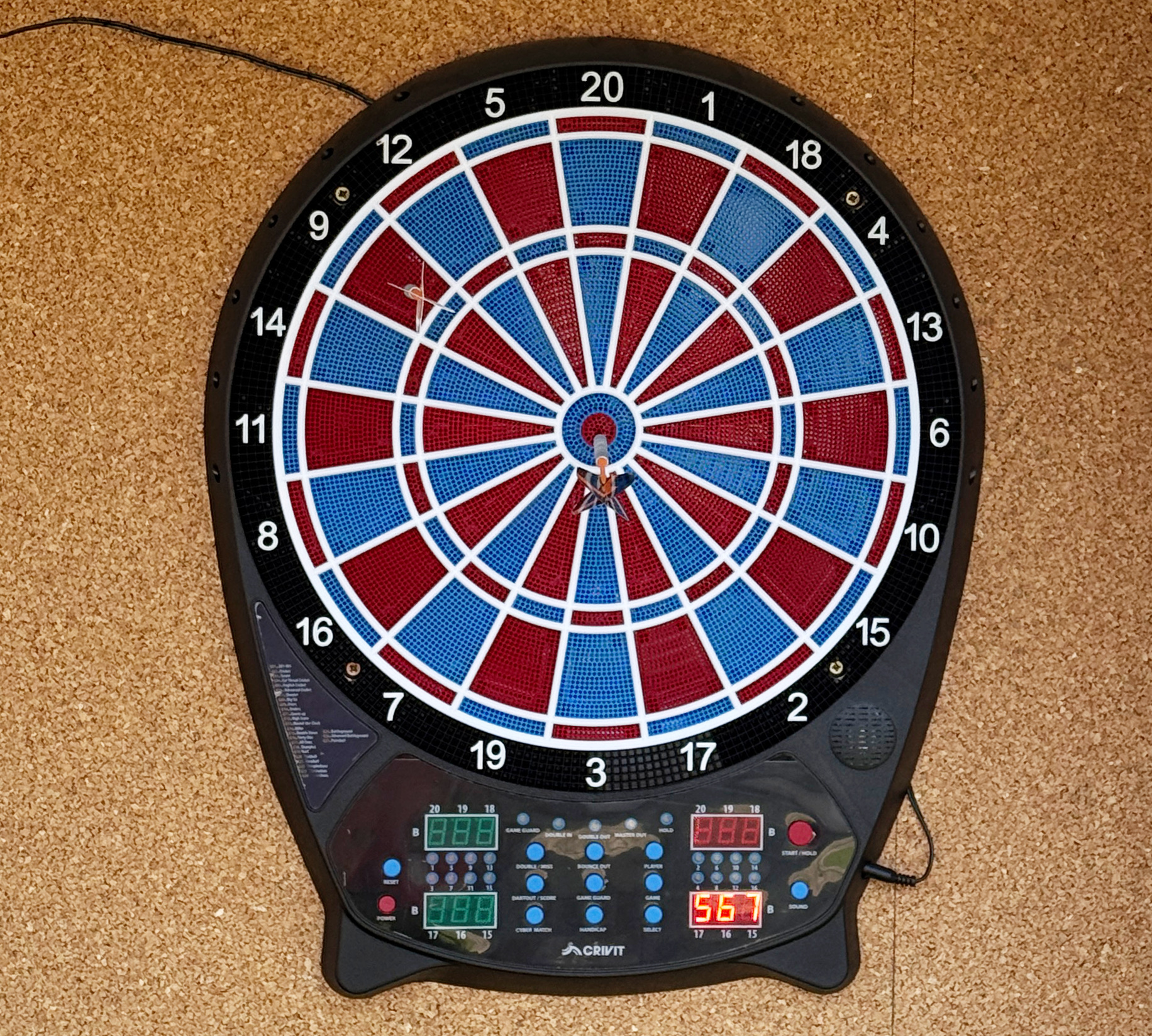
Use of the dart game is at the guests’ own responsibility.
Please use the game only for its intended purpose.
- No one should stand in front of or near the dartboard while darts are being thrown.
- Never aim darts at people or animals.
- Darts may cause injury, therefore children may only use the game under adult supervision.
- Only the supplied soft-tip darts may be used.
- Please take care of the equipment and surrounding area while using the game.
- Do not continue using damaged or broken darts.
- After use, please place the darts back into the side holders of the dartboard.
The accommodation provider is not responsible for injuries or damage caused by improper or careless use, or by not following the house rules. Any damage caused to the equipment on purpose or by careless use must be paid for by the person who caused it.
Explanation of the buttons
POWER
Press the POWER button to switch the product on and off.
GAME
Press the GAME button to select a game. The displays will show the game number, above left, the name of the game, above right, below left, the game options are shown, and below right, the number of players. Note: While the game is running, press GAME once to stop the game and restart.
SELECT
Press the SELECT button to select options for all players within the current game. Note: Abbreviations for the various options are shown below left on the display.
CYBER MATCH
Press the button CYBER MATCH button to start a game against a virtual opponent. Via repeatedly pressing the button, you set the virtual player’s level (C1 = most challenging opponent – C5 = least challenging opponent). Note: After one throw you can delete the last throw by pressing the CYBER MATCH button and repeat it.
DARTOUT/SCORE
Press the button DARTOUT/SCORE to receive an electronic throw suggestion, for games 301, 401, 501 etc. when your score is below 160. The double and triple throws are designated with 2 and 3 lines respectively. Note: If you keep the button depressed during the game, the left-over lives of the players are indicated, while playing a specific game.
BOUNCE OUT
If you press this button during a game, the last throw is made redundant. You may not repeat the throw.
RESET
Press the RESET button to reset all scores for a specific game. Note: The volume is reset to the standard setting of 4.
GAME GUARD
The GAME GUARD button blocks all buttons while a game is in progress. The LED “game guard” lights up as a reminder.
PLAYER
Press the PLAYER button to select the number of players before the game begins. You have options to play with 1 to 16 players, or to play team games (2-2 to 8-8). During a game, the first four players’ points are displayed when you press the PLAYER button. Keep the PLAYER button depressed to see further players’ points. Note: The amount of players is shown on the LED displays, via the relevant lights.
DOUBLE/MISS
Press the button DOUBLE/MISS, to set the function Double In or Double Out for the
G01 game.
Press 1 time: Double In, Press 2 times: Double Out (red light on the left Score Board, 10), Press 3 times: with Double In, Double Out, Press 4 times: Master Out, Press 5 times: Double In/Master Out, Press 6 times: all selected – no LED. Press the button DOUBLE/MISS after one throw to reduce the number of left-over darts with no-hits.
SOUND
Default setting: SOUND setting 4. Press the SOUND button to choose between 7 volume settings, or to switch off the sound.
START/HOLD
Press the START/HOLD button to start a game, or to change to the next player during a game. Note: The darts are most easily removed from the dartboard by twisting each dart gently to the right, as you remove them. 3. Press the button <START/HOLD> for the next player’s turn.
HANDICAP
Before the start of the game, you may use this button to set varying difficult levels for the different players. First press the button <PLAYER> and select Player 1. Then press the <HANDICAP> button and set the handicap for Player 1. Then press the button <PLAYER> and select Player 2. Then set the handicap for Player 2. Set as many handicaps as there are players. Press the button START/HOLD to start a game. Note: Before the game starts, the individual handicaps are displayed on the LED panel.
Game settings
Set a game as follows:
1. Use the <GAME> button to select your game option.
2. Press the <PLAYER> button to select the number of players (1-16 players). Note: When you press the button <CYBERMATCH>, you play against the computer.
3. Use the <HANDICAP> button to set the level of difficulty or each player.
4. Press the button <DOUBLE/MISS> for games 301-901, to select further options.
5.Press the button <START/HOLD> to start the game.
Game sequence
1. Every player throws 3 darts per round. After the third dart, a signal goes off and the display flashes.
2. Carefully remove the darts from the dartboard. Note: Darts are easiest to remove by gently turning them to the right while pulling them out.
3. Press the <START/HOLD> button and the next player’s turn will begin.
Game options and list of game options
The following table lists the possible games with numbers, designations, abbreviations and selection options.
G01 | 301-901 (Std) | OPT: 301, 401, 501, 601, 701, 801, 901
With this game, points for every dart played per round (3 throws per player) are deducted from the starting point values (e.g. 301 or 501 etc.). The player who reaches (exactly) 0 first, wins the game. If you throw too many points, your round is not evaluated, and you start with the point from the previous round again. Select the options Double-IN/Double-OUT via the button <DOUBLE/MISS>: OP1: Double-IN – the game only begins when a double segment has been struck. OP2: Double-OUT – you need to strike a double segment to end the game. OP3: Double-IN-OUT – you need to strike a double segment to start and end a game. OP4: MASTER-OUT – you need to strike a double or triple segment to end the game. OP5: Double-IN/MASTER-OUT – you first need to strike a double segment, and to end the game you need to strike a double or triple segment. Press the <SELECT> button to change between games 301-901. OP6: Standard – the game begins no matter which segment you hit.
G02 | CRICKET (Cri) | OPT: Std/nc
Here, you play exclusively with the numbers 15 to 20, with the bull and the bulls-eye. The aim is to attain the highest possible points, and to close off the correlating numbers (segments). You throw three darts per round. If you manage to strike one number three times, the number (segment) is opened. Only strikes on the opened segment earn points. If your opponent also strikes the opened segment three times, it is closed again, and you cannot gather more points in this segment. The double and triple segments count the same as 2 and 3 strikes. You may open the segment in any order. The winner is the player who scores the most points, and closed off the most segments. If you’ve closed off most of the segments, but have less points, you must attempt to strike the open segments before your opponent closes of the segments. Choose the various options via the <SELECT> button.
NO-SCORE-CRICKET
This game is a derivative of cricket, in which you close off the segments via successful strikes. Points are not earned or collected in this game variant, and the winner is the player who has closed off the most segments. Choose this option via the <SELECT> button.
G03 | SCRAM (Scr) | OPT: -
(for 2 players or two teams) With this cricket-related variant of the game, only the numbers 15 to 20, the bull and the bulls-eye, counts. You play two rounds. In the first round, Player 1 tries to close off the opened segments. Your opponent, Player 2, can only collect points in the open segments. The first round ends when all open segments have been closed off. In round two, your opponent, Player 2, tries to close off all segments and you try to score points. The player with the most points, wins.
G04 | CUT THROAT CRICKET (Cut) | OPT: Cri
With this variant of cricket, the aim is to close off segments, and earn as few points as possible. The player with the lowest point value, wins. You only earn points in this game variant, if your opponent strikes segments which have been closed off. Example: You close off Segment 20 in the second throw, and your opponent struck the single 20 with his/her first throw, and with his/ her second throw, the double 20. If s/he again strikes Segment 20 with his/her third throw, the points are scored by your opponent.
G05 | ENGLISH CRICKET (EnG) | OPT: -
(only for 2 players) In this cricket variant, you need to strike the bull and/or the bulls-eye nine times, to end the round. The bulls-eye counts twice. If your opponent fails to strike the bulls-eye, s/he collects the points earned by the throw. You may aim to collect points in the first round, s/he must reach the 40-point mark, however. If you strike the bull or bulls-eye, your opponent will forfeit a bull or bulls-eye respectively. You gain more time to collect points. When your opponent strikes the bulls-eye nine times, the first round is over, and the second round begins, as the roles are reversed.
G06 | ADVANCED CRICKET (ACr) | OPT: -
This Cricket variant is for advanced players. Only double and triple segments count, with double segments counting for one, and the triple segments counting double. The bull counts for one, and the bully-eye counts double, like in cricket.
G07 | SHOOTER (Sho) | OPT: 6, 7, 8, 9, 10, 11, 12
In this game, the computer chooses one segment at random, which is displayed anew for every round. You must hit this segment. Single segments count for one, and double segments count double, and triple segments count triple, a bull counts quadruple. When the computer selects a bully-eye, then a bull counts double and a bullseye counts quadruple. The player with the most points, wins. Choose the number of rounds via the <SELECT> button: OP1: 6 Rounds OP2: 7 Rounds OP3: 8 Rounds OP4: 9 Rounds OP5: 10 Rounds OP6: 11 Rounds OP7: 12 Rounds
G08 | BIG SIX (bSi) | OPT: 3, 4, 5, 6, 7
With this game, the 6 is the first target segment. If you miss the 6, a life is subtracted. Your opponent will attempt hit the 6. If you hit the target segment within the first two throws, the third throw is the decider for the next target segment. You win if your opponent loses all his/her lives first. Choose the number of lives via the <SELECT> button: OP1: 3 Lives OP2: 4 Lives OP3: 5 Lives OP4: 6 Lives OP5: 7 Lives
G09 | OVERS (Our) | OPT: 3, 4, 5, 6, 7
Every player throws three times. If their throws earn the most points in the first round, their opponent must exceed the point score. Otherwise s/ he loses a life. The first player to lose all his/her lives, loses the game. Choose the number of lives via the <SELECT> button: OP1: 3 Lives OP2: 4 Lives OP3: 5 Lives OP4: 6 Lives OP5: 7 Lives
G10 | UNDERS (Und) | OPT: 3, 4, 5, 6, 7
This game pre-supposes a point score of 180. Every player throws three times. If you throw the least points in the first round, your opponent must score less than you. Otherwise s/he loses a life. If you miss, you are allocated 60 penalty points. The first player to lose all his/her lives, loses the game. Choose the number of lives via the <SELECT> button: OP1: 3 Lives OP2: 4 Lives OP3: 5 Lives OP4: 6 Lives OP5: 7 Lives
G11 | COUNT UP (CUP) | OPT: 300, 400, 500, 600, 700, 800, 900, 999
The aim of this game is to reach a specified point score. Every successful throw counts. The player who reaches, or exceeds, the pre-specified point score, is the winner. Choose the specified point scores via the <SELECT> button: OP1: 300 OP2: 400 OP3: 500 OP4: 600 OP5: 700 OP6: 800 OP7: 900 OP8: 999
G12 | HIGH SCORE (HSC) | OPT: 3r, 4r, 5r, 6r, 7r, 8r, 9r, 10r, 11r, 12r, 13r, 14r
Every player may throw three darts per round. The aim of this game is to score the highest total score. If you reach the highest total score at the end of the specified round, you are the winner. Choose the number of rounds via the <SELECT> button: OP1: 3 Rounds OP2: 4 Rounds OP3: 5 Rounds OP4: 6 Rounds OP5: 7 Rounds OP6: 8 Rounds OP7: 9 Rounds OP8: 10 Rounds OP9: 11 Rounds OP10: 12 Rounds OP11: 13 Rounds OP12: 14 Rounds
G13 | ROUND THE CLOCK (ron) | OPT: r01, r05, r10, r15, d01, d05, d10, d15, t01, t05, t10, t15
Every player must hit the bull and/or the bullseye in sequence, from segments 1 to 20. You have three throws per round, and you must hot the specified segments. Once you’ve hit the specified segment, the next segment is indicated. You win if you hit all the specified segments first. Choose the various options via the <SELECT> button: OP1: The game begins in segment 1. OP2: The game begins in segment 5. OP3: The game begins in segment 10. OP4: The game begins in segment 15. Double and triple segments count as one.
ROUND THE CLOCK Double
For this game, choose the option double = d via the <SELECT> button. The same rules apply, as for the game ROUND THE CLOCK, but only double segments count. Choose the various options via the <SELECT> button: OP1: The game begins in segment 1. OP2: The game begins in segment 5. OP3: The game begins in segment 10. OP4: The game begins in segment 15.
ROUND THE CLOCK Triple
For this game, choose the option triple = t via the <SELECT> button. The same rules apply, as for the game ROUND THE CLOCK, but only triple segments count. Choose the various options via the <SELECT> button: OP1: The game begins in segment 1. OP2: The game begins in segment 5. OP3: The game begins in segment 10. OP4: The game begins in segment 15.
G14 | Killer (HiL) | OPT: 3, 4, 5, 6
For two or more players. Choose the number you wish to hit. The LED display shows SEL. This is your number, and all the players must select different numbers. Once every player has selected a number, each player must hot the double segment of their selected number to earn the “killer” status. Once you are a killer, you can kill the other players by hitting their selected segments. The player thus loses a life and is no longer a killer him/herself. In order to gain the killer status again, the specific player must once again hit the selected double segment. If you, as a killer hits your own segment by mistake, you lose a life and your killer status. Whoever is left over at the end, is the winner. Choose the number of lives via the <SELECT> button: OP1: 3 Lives OP2: 4 Lives OP3: 5 Lives OP4: 6 Lives
G15 | DOUBLE DOWN (don) | OPT: -
The aim of this game is to gain the most points in the active segments. All players start off with 40 points. The game begins with one throw on segment 15. If you don’t hit segment 15, your point score is halved. If you hit 15, 15 points are added to your point score. The double and triple throws also count. The next round begins in segment 16. The segments are played in the table sequence. The player with the highest score, wins.
G16 | DOUBLE DOWN 41 (F41) | OPT: -
This game is played like Double Down, except that you play another round on top. You need to reach a point score of exactly 41 with three throws.
G17 | ALL FIVES (ALL) | OPT: 51, 61, 71, 81, 91
The aim of the game is to reduce the pre-set results of 51, 61, 71, 81 or 91 in every round. In order to get results, the total points for each round must be divisible by 5. If, for example, a player aims for 20 points in a round, the result is 4 (20÷5=4). Every score which is not divisible by 5, does not count. If one of the three darts doesn’t hit the board, the round is rated as a no-results round. The first player to reach or exceed the selected point score, is the winner. Choose the specified total point scores via the <SELECT> button: OP1: 51 Points OP2: 61 Points OP3: 71 Points OP4: 81 Points OP5: 91 Points
G18 | SHANGHAI (Shi) | OPT: 01, 05, 10, 15, S01, S05, S10, S15
In this game, you need to hit segment one in the first round, segment 2 in the second round etc. until segment 20 is reached, e.g. bull or bullseye. Only the hits in the correct order count. If you miss a number, no points are scored, and you continue with the next sequential number. The player with the most collected points, wins. Choose the game options via the <SELECT> button: OP1: The game begins in segment 1. OP2: The game begins in segment 5. OP3: The game begins in segment 10. OP4: The game begins in segment 15.
SUPER SHANGHAI (S)
This game is played like the game Shanghai, with the exception that you must hit double and triple segments. Choose the game options via the <SELECT> button: OP1: The game begins in segment 1. OP2: The game begins in segment 5. OP3: The game begins in segment 10. OP4: The game begins in segment 15.
G19 | Golf (GoL) | OPT: 09H, 10H, 11H, 12H, 13H, 14H, 15H, 16H, 17H, 18H
Aim for the segments numbering 1-18, in sequence, and hit these in sequence (round 1 = aim for segment 1, round 2 = aim for segment 2 etc.). The aim of the game is to score as few points as possible in every round. Point evaluation: Triple = 1 point (best valuation, the next player continues the game automatically) Double = 2 points Single = 3 points A no-hit in the pre-specified segment earns 5 points. Each player is allowed three throws per segment. If you are satisfied with a double on your first throw, you may hand over to the next player and receive 2 points for the relevant segment. Should you hit a single in the relevant segment, you receive 3 points. In such a case you may decide to hand over to the next player, or to take advantage of your second throw. If you miss the relevant segment, your score increases from 3 to 5 points. If you better your performance in your second throw, your point score will decrease from 3 to 2, and you may again choose to throw a triple to improve your score (or you may worsen your score again). If you go over your selected point score, you are eliminated from the game. The winner is the last standing player, or the player with the least points after playing 18 segments.
G20 | FOOTBALL (Fot) | OPT: -
Select a segment, either via a throw on the board, or by selecting a button. After selection, the segment which players must hit, is selected. The selected segment is the starting point, the opposite segment is the target. Example: If you’ve selected segment 20, the target segment is 3. The playing area is divided into 11 segments, which you must hit one after the other. Sequence: First, the double-20 segment, then the outer ring, single segment 20, triple-20, inner ring single segment 20, bull, bulls-eye, inner ring single-3-segment, triple 3, outer ring, single-3-segment, double-3-segment. The segments which must be hit, are displayed.
G21 | BASEBALL (bAS) | OPT: 6, 7, 8, 9
With this game, you play nine rounds (innings). Every player throws three darts per inning. Single segment = one station Double segment = two stations Triple segment = three stations Bull and/or bulls-eye segment, “home run” (can only be attempted with the third throw) Your aim is to accomplish as many “runs” per round as possible. The displays shows the relevant stations.
G22 | STEEPLECHASE (Hor) | OPT: -
This game is like an obstacle course, starting in segment 20, all the way around the electronic dartboard once, in a clock-wise direction. The end is in segment 5, and then you still need to hit the bull, or the bulls-eye. During the obstacle course, you may only hit the inner single elements, those that are positioned between the bull or bulls-eye an the triple ring. The segments triple 13, triple 17, triple 8 and triple 5 are obstacles which you must also hit.
G23 | ELIMINATION (Eli) | OPT: 3, 4, 5
In this game, you must best the score of your opponent, who’s turn was just before yours, in three throws. If you don’t succeed, you lose a life. Choose the number of lives via the <SELECT> button: OP1: 3 Lives OP2: 4 Lives OP3: 5 Lives
G24 | HORSESHOES (Hsh) | OPT: 15, 16, 17, 18, 19, 20, 21, 22, 23, 24, 25
In this game, only hits in the 20 and 3 segments count. Double and triple segments in these segments also count. Choose the number of points via the <SELECT> button: OP1: 15 Points OP2: 16 Points OP3: 17 Points OP4: 18 Points OP5: 19 Points up till OP10: 25 Points
G25 | BATTLEGROUND (bAt) | OPT: Sin, dou, tri, GEn
In this game, you take over the upper half of the electronic dart game, and you must hit the bottom half with your three throws. Your opponent must take over the bottom half, and must hit the upper half. Who takes over which half, is decided before the game. Choose the various options via the <SELECT> button:
Battleground Double
Only double segments count.
Battleground Triple
Only triple segments count.
Battleground General
Play this game like the standard Battleground game, but you need to strike the bull and/or the bulls-eye to finish off. Upper half: Segments: 11, 14, 9, 12, 5, 20, 1, 18, 4, 13. Lower half: Segments: 6, 10, 15, 2, 17, 3, 19, 7, 16, 8.
G26 | ADVANCED BATTLEGROUND (Adb) | OPT: -
This game is played like the standard Battleground game. However, double and triple segments are taboo, and may not be hit. If you hit any taboo segments, you lose a life.
G27 | PAINTBALL (PbA) | OPT: Sin, dou, tri
This game is similar to the Battleground game. Hit the bulls-eye twice, you capture the enemy’s flag. The aim is to destroy the enemy’s segments, or to capture the enemy’s flag. Choose the various options via the <SELECT> button:
Paintball Double
Here, only double segments count, and the bullseye must be hit three times.
Paintball Triple
Here, only the triple segments count, and the bully-eye must be hit three times.

